.webp)



.webp)
.svg)


TL;DR
- Prevent churn by identifying emerging customer frustrations in hours, not days, before they escalate into cancellations or downgrades.
- Reduce revenue leakage by surfacing root causes in customer language, enabling teams to fix the real problem, not just react to declining metrics.
- Help CX and support leaders prioritize issues by business impact, so high-risk accounts and segments get immediate attention.
- Enable product teams to act faster with evidence-backed AI insights that pinpoint which features, updates, or integrations are driving dissatisfaction.
- Give executives real-time visibility into churn risks and operational blockers, supporting confident decisions without waiting for post-mortem reports.
- Move from AI-assisted tagging to AI-native intelligence, where agents connect signals, explain why issues occur, and recommend actions automatically.
You open your dashboard, CSAT is down eight points, Billing tickets jumped 40 percent, and handle time is creeping up. The CEO wants to know what happened. Your managers wish to clear the next steps. But the charts only show that things got worse, not why.
So you start digging. You pull tickets, read customer conversations, and try to connect the dots. By Thursday, you finally spot the issue: a recent change to the payment processor is causing card declines and confusing error messages. By Friday, product and support are aligned on what to fix.
The problem is, this all started on Monday.
Four days went by while hundreds of customers struggled, and some canceled. Not because your team moved slowly, but because your tools only show results after the damage is done. They don’t point you to the cause early enough.
That’s where most AI “insights” tools fall short. Automated tags and summaries aren’t real intelligence. Real intelligence shows patterns as they form, so you can act right away instead of playing detective after the fact.
Why Most Customer Insights AI Falls Short
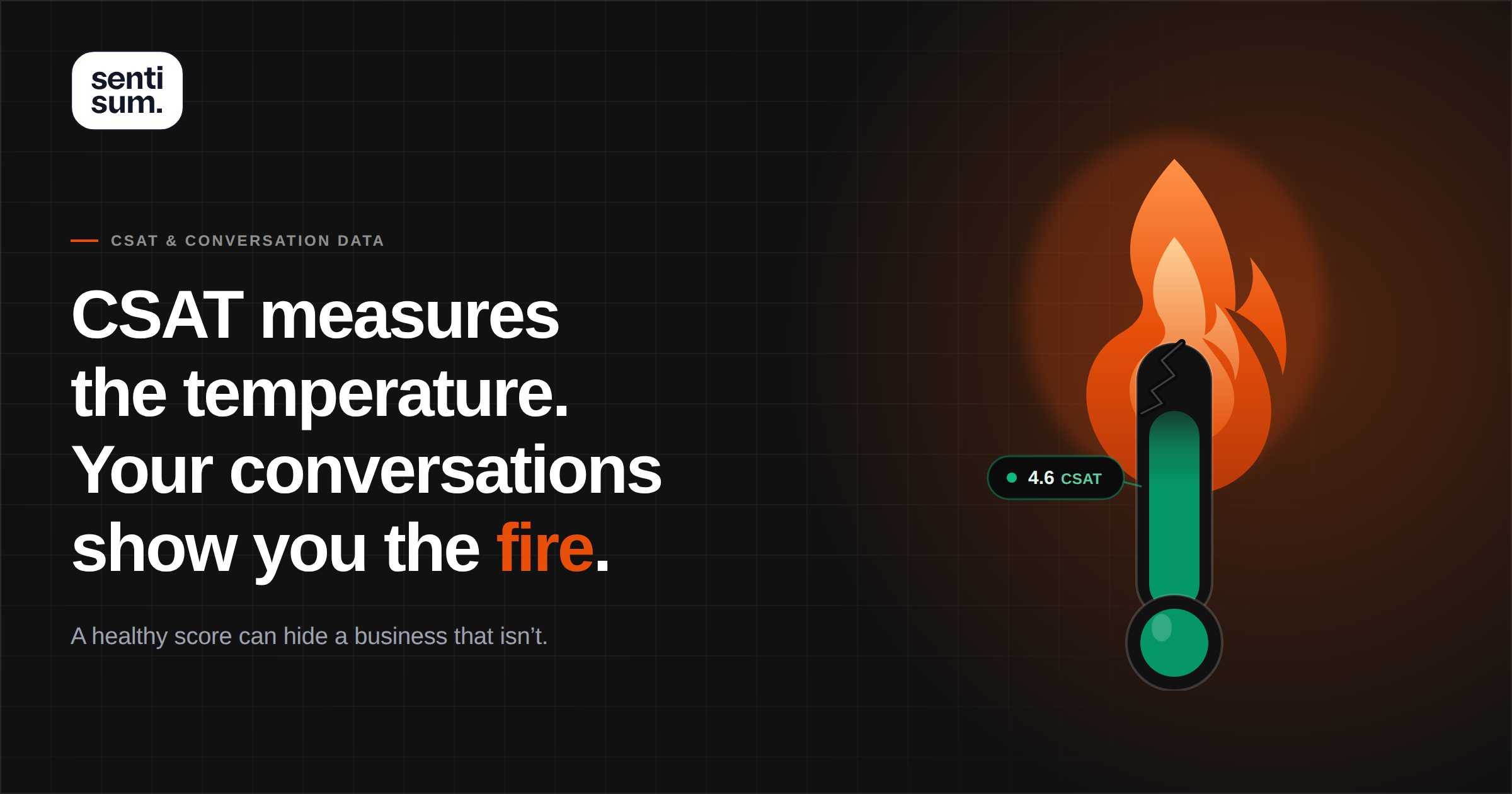
The reality for most CX teams. Adding “AI” to your support stack usually gives you automated ticket tags like “billing issue,” “shipping delay,” or “product question,” plus sentiment scores that mark interactions as positive or negative, and weekly dashboards that say things like “billing tickets are up 40%” or “negative sentiment is rising in shipping.
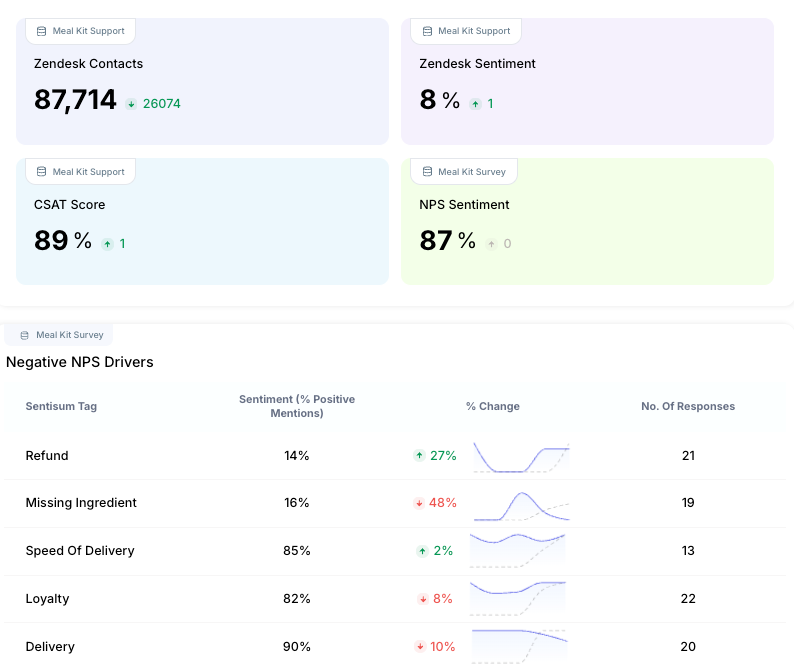
You still don't know why billing tickets spiked. Were customers experiencing payment failures, unclear invoices, pricing confusion, or something else entirely?
The dashboard categorized 400 tickets as "billing" but didn't reveal what customers were actually experiencing or which issue posed the most significant risk of churn.
So you export a CSV, open 20 random tickets, and start manually piecing together patterns. "Okay, several mentions payment was declined, a few reference double charges, some are confused about the renewal date." Essentially, you're doing the analysis the AI was supposed to handle.
This is why most mid-market and enterprise CX teams still spend hours each week in spreadsheets and ticket queues trying to understand their customers, even after implementing AI-powered tools.
Here's why traditional AI customer feedback analysis fails the operational test:
- Insights are delayed. Batch-processed reports mean yesterday's sentiment drop only shows up today. By then, dozens more customers have contacted support about the same problem, and early churn signals have been missed.
- Disconnected from customer language. You see "negative sentiment in onboarding" aggregated across 50 tickets. Still, you miss that twelve customers specifically said, "I can't find where to import my data" (a solvable UI issue, not a fundamental product problem).
- No prioritization framework. A spike in "how do I cancel my subscription" tickets from enterprise accounts should trigger immediate escalation to customer success. Instead, it appears as a single data point in your weekly report alongside less urgent volume changes.
- Extra steps to access insights. Logging into a separate analytics platform, running queries, exporting data, and pasting screenshots into Slack adds friction between seeing a problem and solving it. By the time insights reach the teams who can act on them, the moment has passed.
- Analysis still depends on you. Most AI stops at categorization and scoring. You're still the one connecting dots, identifying root causes, and determining what actions to take. The intelligence work hasn't been automated; it's just been assisted.
A real AI customer insights tool should analyze before you even start digging, explain what's happening in customer language, and deliver actionable intelligence where your team already works.
What Real-Time AI-Driven Customer Insights Require
What actually needs to happen for customer insights to be helpful when managing live support operations across multiple channels, time zones, and the constant influx of urgent escalations.
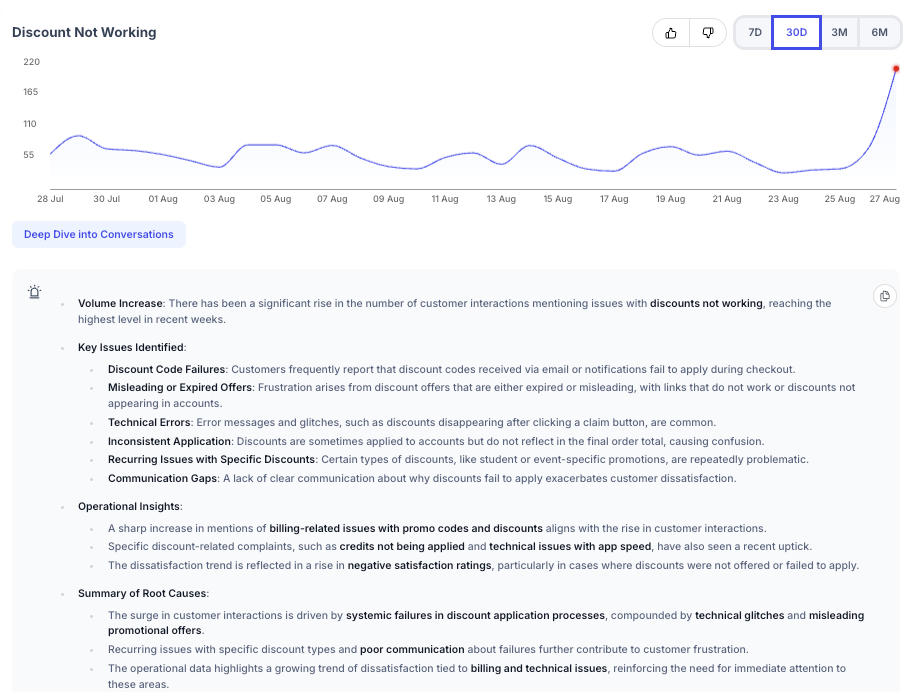
- Monitoring that works continuously. Right now, you check metrics when you remember or when someone asks. Real-time insights don’t wait. They analyze every ticket, chat, call transcript, and review as soon as it closes. If a new issue arises at 10:00 AM, you should be aware of it by 10:30 AM, not during next week’s operations review.
- Context that separates normal from urgent. A 25% jump in tickets might be fine if it’s Black Friday for a DTC brand. On a random Wednesday, it’s a red flag. Accurate real-time insights track baselines by time, customer segment, and product line, and flag anomalies in the moment, such as “30 login errors in the past hour,” rather than just daily totals.
- Evidence, not just scores. Saying “sentiment is down” isn’t enough for a VP or product team. You need examples of actual customer quotes that show patterns and clarify what’s going wrong. The right AI surfaces these conversations automatically, so you don’t have to dig through tickets yourself.
- Insights delivered where work actually happens. Your support team uses Zendesk or Freshdesk, ops coordinates in Slack, and leadership wants updates without extra meetings. If insights live only in a separate analytics tool, they create more work. You need alerts in Slack, summaries in your helpdesk, and automated briefings without running manual reports.
If your current system still makes you log in, query, interpret, and report manually, you don’t have AI-driven insights; you have AI-assisted reporting. The intelligence still depends on you.
How AI Agents Transform the Way Customer Insights Are Delivered
The difference between traditional AI customer feedback analysis and AI agents isn't subtle; it changes who does the work.
Right now, AI helps you find information faster. It tags tickets, allowing you to filter them. It scores sentiment so that you can sort by it. It surfaces trending topics so you know where to look. But you're still the one connecting dots, identifying root causes, and determining what to do about it.
AI agents flip this relationship. They do the connecting, identifying, and recommending. You make the final call on what action to take.
1. Monitoring conversations as they happen
This is the specific example of how this works differently.
Traditional approach: Your support team closes 600 tickets on Monday. That night, your analytics platform processes them in a batch job. Tuesday morning, you log in and see Monday's data.
You notice an uptick in "product not working" tickets, 45 compared to your usual 20. You filter through them and realize that customers using the mobile app are experiencing crashes after the latest update.
You message your team leads, who confirm it's widespread. You loop in the product. It's now Tuesday afternoon, and the issue started Monday morning.
AI agent approach: On Monday at 11 AM, an AI agent monitoring your live ticket stream notices that seven customers have mentioned the mobile app crashing immediately after opening in the past two hours.
It cross-references this with your typical patterns; you usually get one or two app crash reports per day. It flags this as an anomaly and sends an alert to your support ops Slack channel:
"Unusual pattern detected: 7 customers reporting mobile app crashes in the past 2 hours (typical: 0-1). All mention 'crashes on open' after the latest update. Representative tickets: #45821, #45834, #45856."
You see this at 11:15 AM. You check the three ticket links, confirm the pattern, and immediately loop in your mobile team. The issue is identified, triaged, and being worked on within an hour of it starting, not the next day after dozens more customers hit it.
That's the operational difference. When you're running support for a SaaS platform, retail operation, or financial services company handling thousands of daily interactions, those hours matter. They are the difference between catching a bug affecting 50 customers and 500.
2. Detecting anomalies and emerging issues early
Most customer support analytics with AI show you trends over time. They'll tell you that refund requests increased 30% this month compared to last month. But that monthly comparison doesn't help you when something breaks on a Tuesday morning.
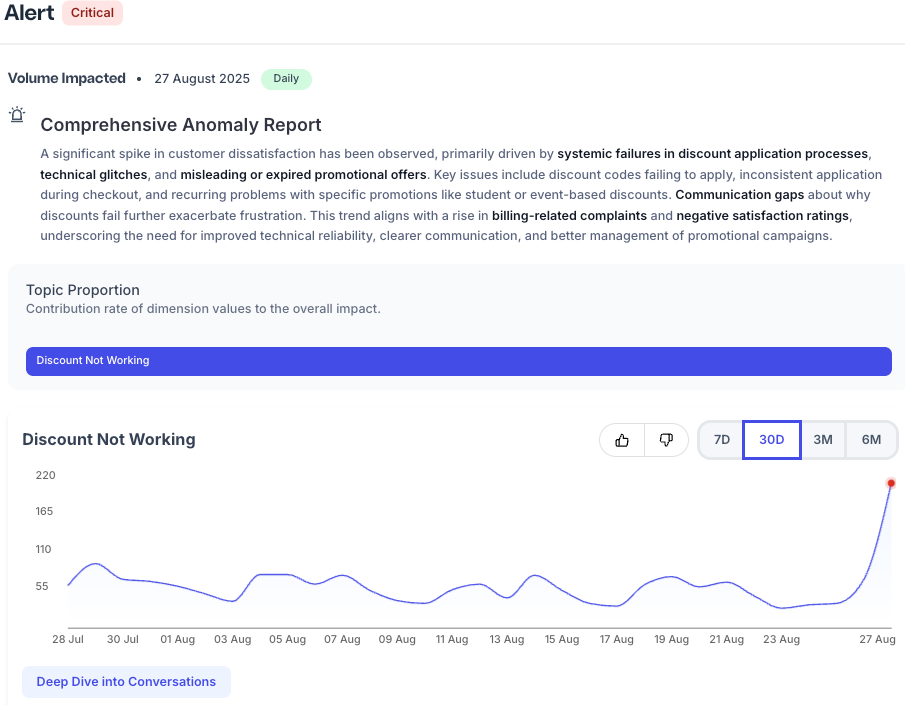
Predictive customer insights work differently because they're trained on your specific patterns and can detect deviations in real-time windows, hourly, not monthly.
Let's say you're a subscription-based business aiming to reduce churn. Your typical refund request pattern is 3-5 per day, with a slight increase on Mondays and a decrease on weekends. An AI agent knows this baseline. On Thursday afternoon, 12 refund requests were received within three hours. The agent flags this immediately because it appears to be a deviation.
But here's where it gets more useful: the agent also analyzes what else is different about these requests. Are they all from customers who signed up in the past month? Are they concentrated in a specific plan tier?
Do they all mention the same pain point? This contextual analysis is what transforms a spike into an actionable insight.
Instead of just "refund requests up today," you get "12 refund requests since 2 PM, all from Enterprise plan customers, 9 specifically mention 'can't integrate with Salesforce.'"
Now you know it's not a general satisfaction issue; it's a technical problem with a specific integration affecting your highest-value segment. That specificity changes how urgently you respond and who you pull into the solution.
3. Explaining the root cause with evidence
This is how most AI for real-time customer insights fail the operational test: when they flag an issue, they don't explain.
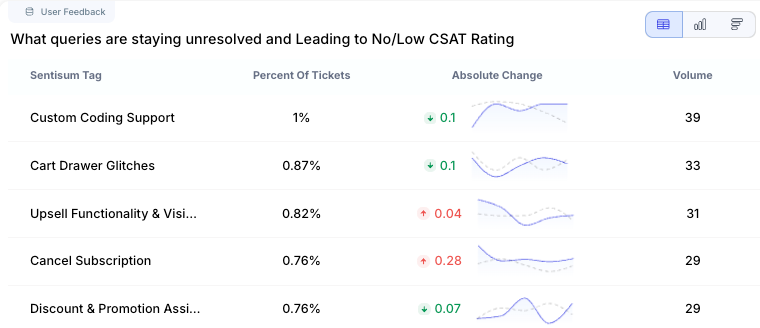
You receive an alert that reads, "Sentiment declining in checkout process." Okay, but why? What specifically about checkout is frustrating customers? Is it the payment options? The shipping cost display? A bug in the promo code field?
The alert created awareness, but not understanding, so you still have to dig through conversations.
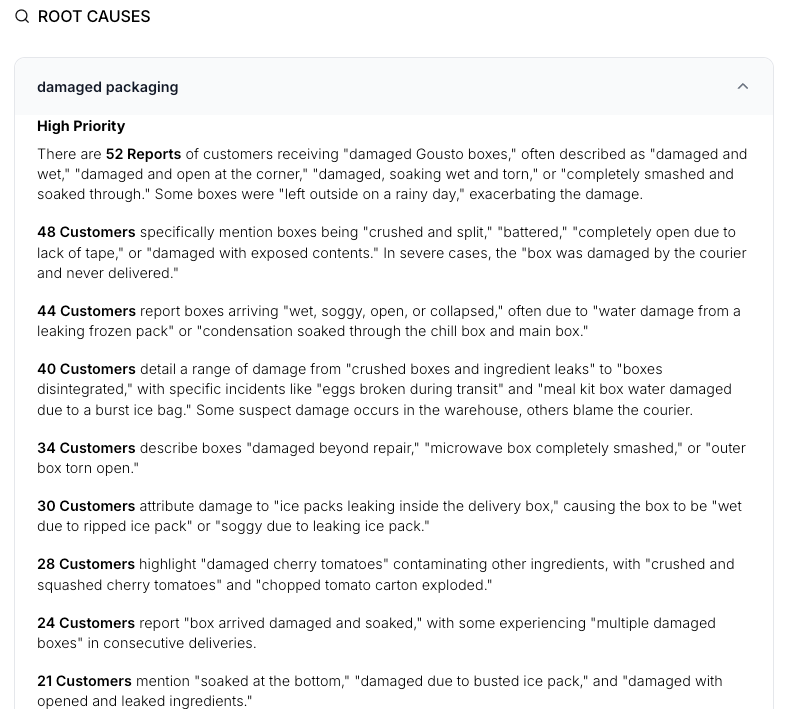
AI agents solve this by doing the analysis work you'd normally do manually. When they detect an issue, they don't just count tickets; they extract and synthesize what customers are actually saying.
That’s not just an alert, it’s a diagnosis. It immediately shows that the issue isn’t actual shipping delays but tracking notification emails failing to send. The timeframe for affected orders is clear, with exact customer quotes illustrating the pattern. Sample tickets are also available for review if more context is needed.
This level of explanation is what makes AI insights for customer experience actually operationally practical. You can forward that summary directly to your operations team or logistics partner, along with everything they need to investigate.
How Sentisum Delivers AI Customer Insights with Kyo
SentiSum isn't built around dashboards you check when convenient. It's built around Kyo, an AI agent that continuously interprets customer conversations and delivers intelligence where and when it matters.
Kyo as an always-on customer intelligence layer
Kyo doesn't wait for you to log in and ask questions. The AI agent monitors every conversation across tickets, chats, calls, surveys, reviews, and CRM notes in real time, highlighting anomalies, summarizing themes, and learning from patterns.
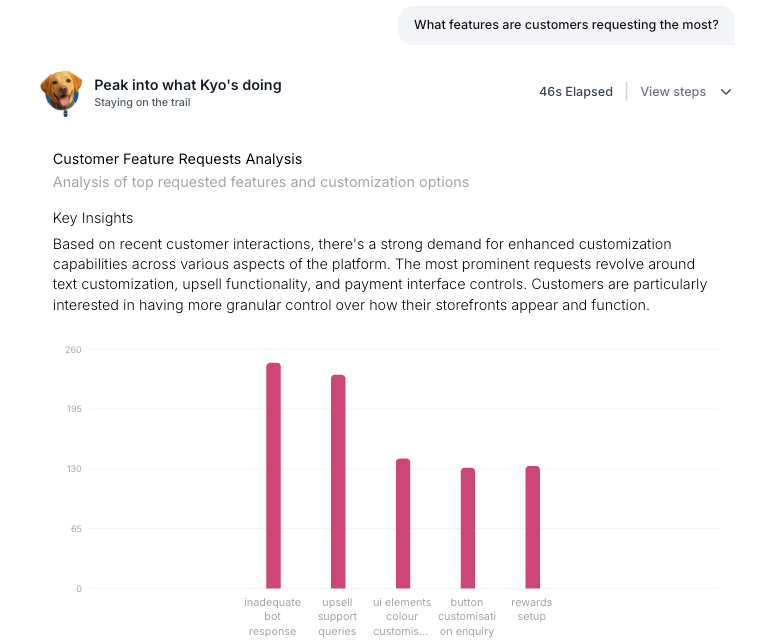
When sentiment shifts, the platform explains why. When volume spikes, it surfaces the conversations driving the increase. When a new issue emerges, it flags it early, before it turns into a crisis.
This frees support leaders from manual reading and analysis. Teams get consistent, directional insight that keeps CX, product, and leadership aligned on what matters now, instead of spending hours pulling tickets to understand what’s happening.
In high-volume support environments, this changes how decisions get made. You’re no longer waiting for weekly reports. You’re operating with live intelligence.
Unified signals across the support ecosystem
Most teams work with scattered data. Tickets in Zendesk, chats in Intercom, calls in Aircall, surveys in Qualtrics. Each channel delivers its own metrics, trends, and sentiment scores, but they rarely communicate with one another.
SentiSum connects these conversations into a single, coherent insight stream. Kyo interprets feedback across channels, identifies themes that span multiple touchpoints, and surfaces issues that may appear minor in isolation but signal larger problems when viewed holistically.
This unified view matters because customers don't think in channels.
A billing complaint may start in chat, escalate to a ticket, and conclude with a phone call. If your AI only sees fragments, it can't understand the whole story.
Insights embedded into daily workflows
Kyo doesn't deliver insights through another dashboard you need to remember to check. The agent surfaces explanations and subsequent actions directly into Slack, Teams, Zendesk, or email where your team already works.
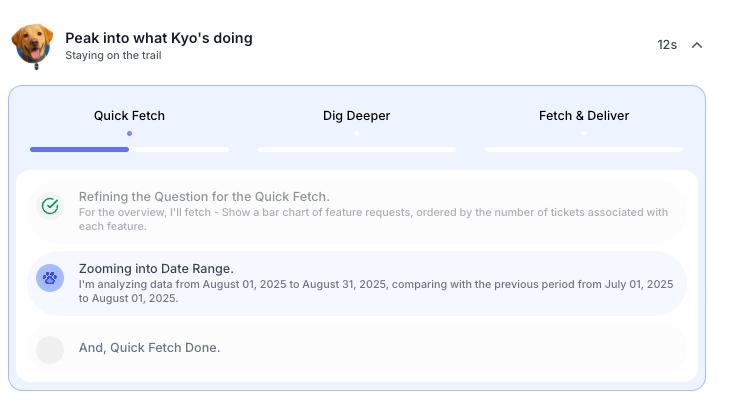
When a new issue emerges, it sends a message. When sentiment drops, you get a notification with context and evidence. When an anomaly is detected, the insight arrives with a clear recommendation for the next steps.
This approach reduces reliance on manual reviews and eliminates the need for endless alignment meetings. Intelligence flows into operations automatically, shortening the time from detection to resolution.
For support and CX teams juggling competing priorities, this delivery model eliminates the gap between knowing and doing. Insight and action arrive together.
How AI Customer Insights Signal Churn and Escalation Early
Here's what every CX executive and CFO needs to understand: your support conversations show you problems before your revenue metrics do.
A customer doesn’t just wake up one day and cancel their subscription. Frustration builds over time, maybe your mobile app keeps crashing, a feature isn’t working as expected, or billing charged them incorrectly, and your support team took three days to respond.
That frustration shows up in support tickets, chat conversations, and call transcripts weeks before it turns into churn. By the time a customer cancels, they’ve usually already gone through a clear progression of dissatisfaction.
Problem → contact support → unsatisfactory resolution → consideration of alternatives → cancellation.
Traditional analytics catch this at the end, when someone cancels or downgrades, it appears in your retention dashboard.
Predictive customer insights catch it early when someone contacts support multiple times about the same issue, when their sentiment shifts from neutral to negative, or when they start asking questions like "How do I export my data?" or "What's your cancellation policy?"
Let's be specific about what this looks like operationally:
Without that alert, they wouldn't have noticed the pattern until the account came up for renewal, at which point the damage would be done, and they would be negotiating from a position of weakness.
This is the strategic value of AI insights for customer experience: support data becomes a forward-looking source of business intelligence, not just an operational efficiency tool.
Your support team is already having these conversations. The question is whether you're extracting the predictive signals from them or just using them to close tickets.
Companies with sophisticated AI customer intelligence platforms do both: they resolve the immediate issue and capture the strategic signal that this customer is at risk.
What To Look For When Evaluating AI Customer Insights Platforms
If you're evaluating tools in this category, here are the questions that separate real operational intelligence from dressed-up dashboards:
- Can it explain why, not just what? When the platform flags an issue, such as an increase in contacts about pricing, does it tell you specifically which pricing customers are confused about? Can it surface exact customer quotes that illustrate the problem? If you're still manually reading tickets to understand the root cause, the AI isn't doing enough.
- Does it work on your time scale? If you're managing support for a product that serves global customers 24/7, you can't wait for overnight batch processing. Ask vendors: how long after a conversation closes does it appear in the analysis? How quickly can the system detect an emerging issue? If answers are "next morning" or "within 24 hours," it's not real-time.
- Can it connect signals across channels? Show the vendor your support ecosystem. You've got tickets in Zendesk, chats in Intercom, calls transcribed through another platform, surveys in Delighted, reviews on G2, and Trustpilot. Can their platform ingest all of that and find patterns across it? Or are you stuck with siloed insights that miss cross-channel issues?
- Where insights appear matters. It’s not enough for your team to log into a separate platform. Insights need to show up where your team coordinates daily Slack, Teams, or directly in the help desk, so agents can access relevant context without switching tools. Executives should receive briefings automatically, without waiting for someone to compile reports. Seamless workflow integration ensures insights are used rather than ignored.
- Scalability is critical. If you handle 5,000+ support interactions weekly across multiple products and customer segments, generic trend detection isn’t enough. The platform should identify issues by segment, distinguish enterprise from SMB problems, and prioritize based on metrics that matter to your business, like customer lifetime value, contract value, or churn risk, rather than just ticket volume.
- Beyond detection: actionable insights matter. Platforms that truly impact operations don’t just identify problems; they guide next steps. When Kyo flags an issue, it routes it to the right team, suggests specific actions, and provides all the context needed for decisions, eliminating the need for extra research.
Most importantly, ask vendors to demonstrate their platform using data that resembles yours. Not a polished demo account, but actual messy, high-volume, multi-channel support data. See if it can find needles in that haystack.
Turn Delayed Insights Into Clear Action
Support teams don’t struggle because they lack data. They struggle because insights arrive too late, lack context, and sit far from the decisions that could stop escalations, churn, and frustration.
AI for customer insights creates real value only when it explains issues early and shows teams exactly what to do next. It should monitor continuously, catch changes as they happen, and surface clear guidance inside the tools teams already use.
That shift changes how support operates. Instead of reacting to tickets, teams spot risks sooner and act before customers walk away.
If you want to see how this works in practice, book a demo and explore how SentiSum’s AI agent turns everyday support data into proactive CX intelligence.
Frequently Asked Questions
AI reviews every ticket, chat, call transcript, review, and survey as it arrives. It groups issues, spots patterns, finds root causes, and flags unusual behavior in real time. AI agents add context by explaining why problems happen, who’s affected, and what actions teams should take next.
Traditional analytics summarize outcomes after they occur, such as rising tickets or falling CSAT. AI-driven insights explain the reasons by analyzing honest customer conversations as they happen. They detect emerging problems early, surface root causes, and rank issues by business impact, not just volume or averages.
AI removes hours of manual review from the decision-making process. Support leaders receive automatic root cause analysis, real customer examples, affected segments, and clear recommendations. Issues move from detection to action within hours instead of days. Teams prioritize what matters most based on churn risk and customer value.
Real-time customer insights software analyzes tickets, chats, calls, and reviews minutes after they close, not overnight. Teams spot emerging problems within hours, preventing escalation. At scale, this can mean fixing an issue at 50 customers instead of 500.
Yes. Early churn signals appear in support conversations weeks before cancellation. AI tracks rising contact frequency, negative sentiment, repeat issues, and language indicating frustration to flag high-risk accounts early, giving teams time to intervene with context.
Explore Real Success Stories

Explore Success Stories


Talk to a Data Expert